Now Available for Windows

The Desktop Control Panel
for WooCommerce

Stop fighting the slow WordPress admin. CartConsole gives you a lightning-fast, native Windows client to manage products, orders, and inventory — instantly.

Includes a 14-day free trial • Cancel anytime

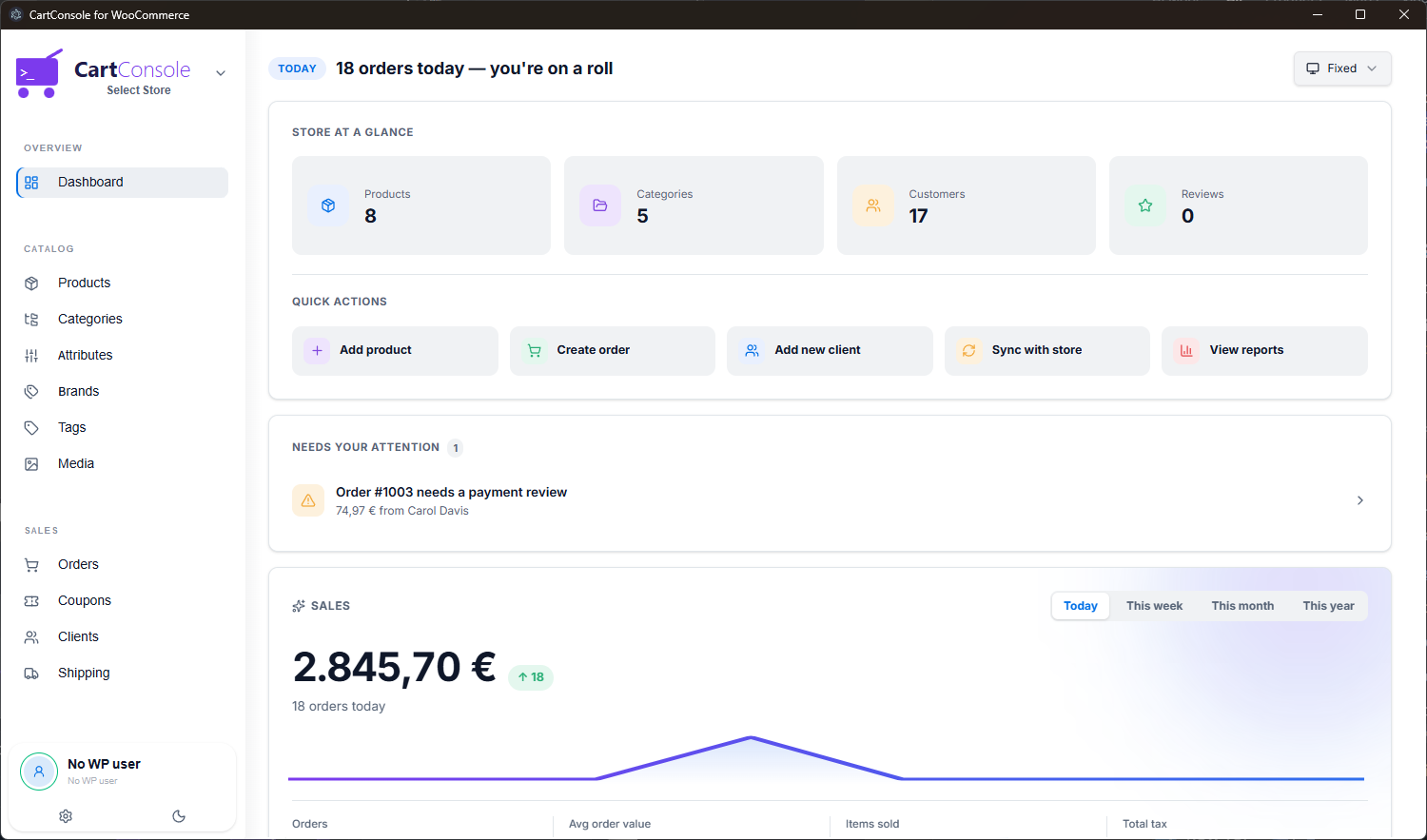
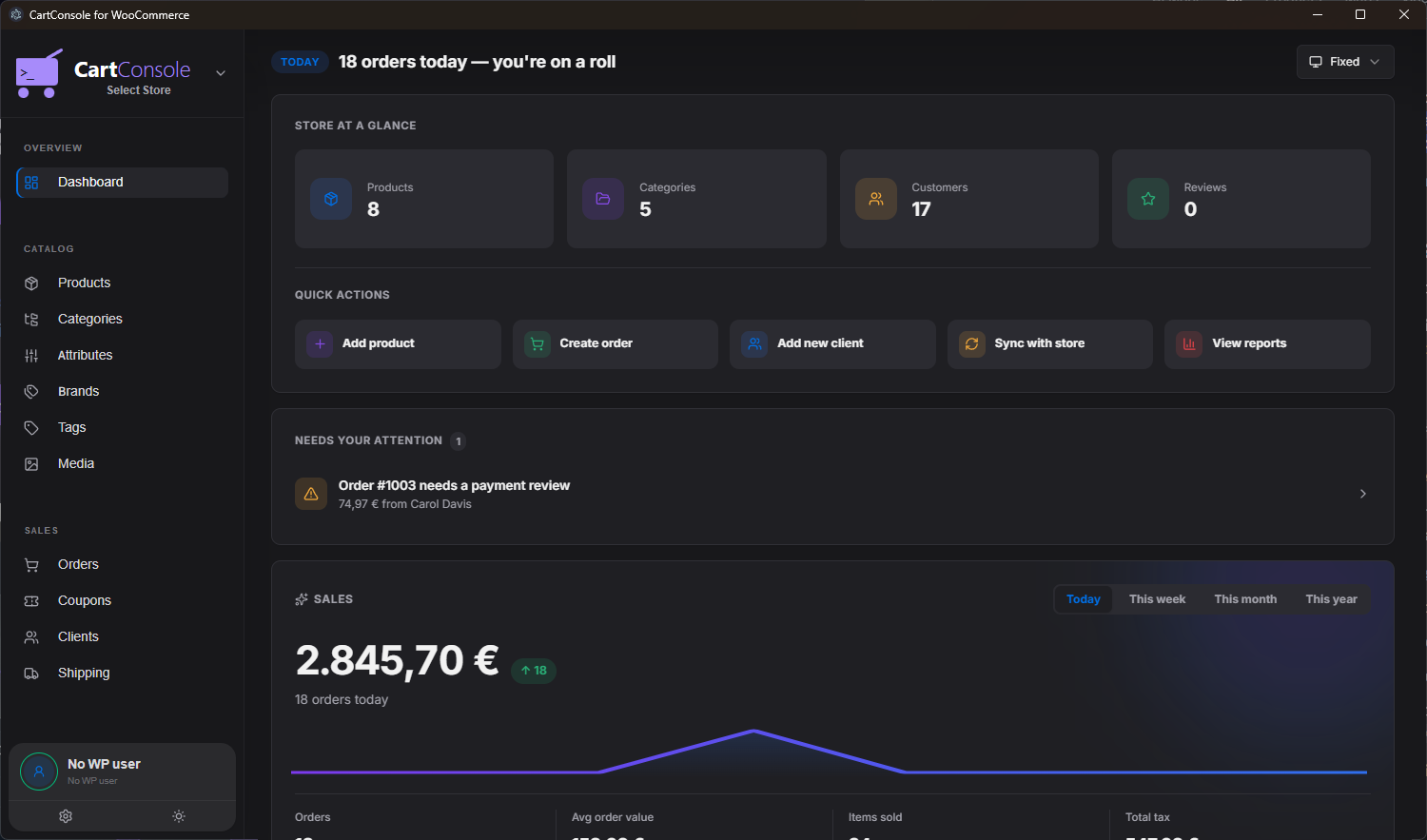
CartConsole Dashboard — Dark Mode CartConsole Dashboard — Light Mode
6
Languages
EN · EL · ES · DE · FR · IT
3
Work Modes
Online · Offline Auto · Offline Manual
10
Stores
Connect up to 10 WooCommerce stores
<1s
Load Time
Native desktop performance
Features

Everything you need.
Nothing you don't.

Built for WooCommerce store owners who value speed, clarity, and control.

⚡

Lightning Fast

Native desktop performance means instant page loads. No more waiting 5+ seconds for the WordPress admin to render.

🌐

Unified Multi-Store View

Aggregate, filter, and monitor orders, inventory, and analytics across all your connected WooCommerce stores simultaneously in a single unified view.

📦

Product Management

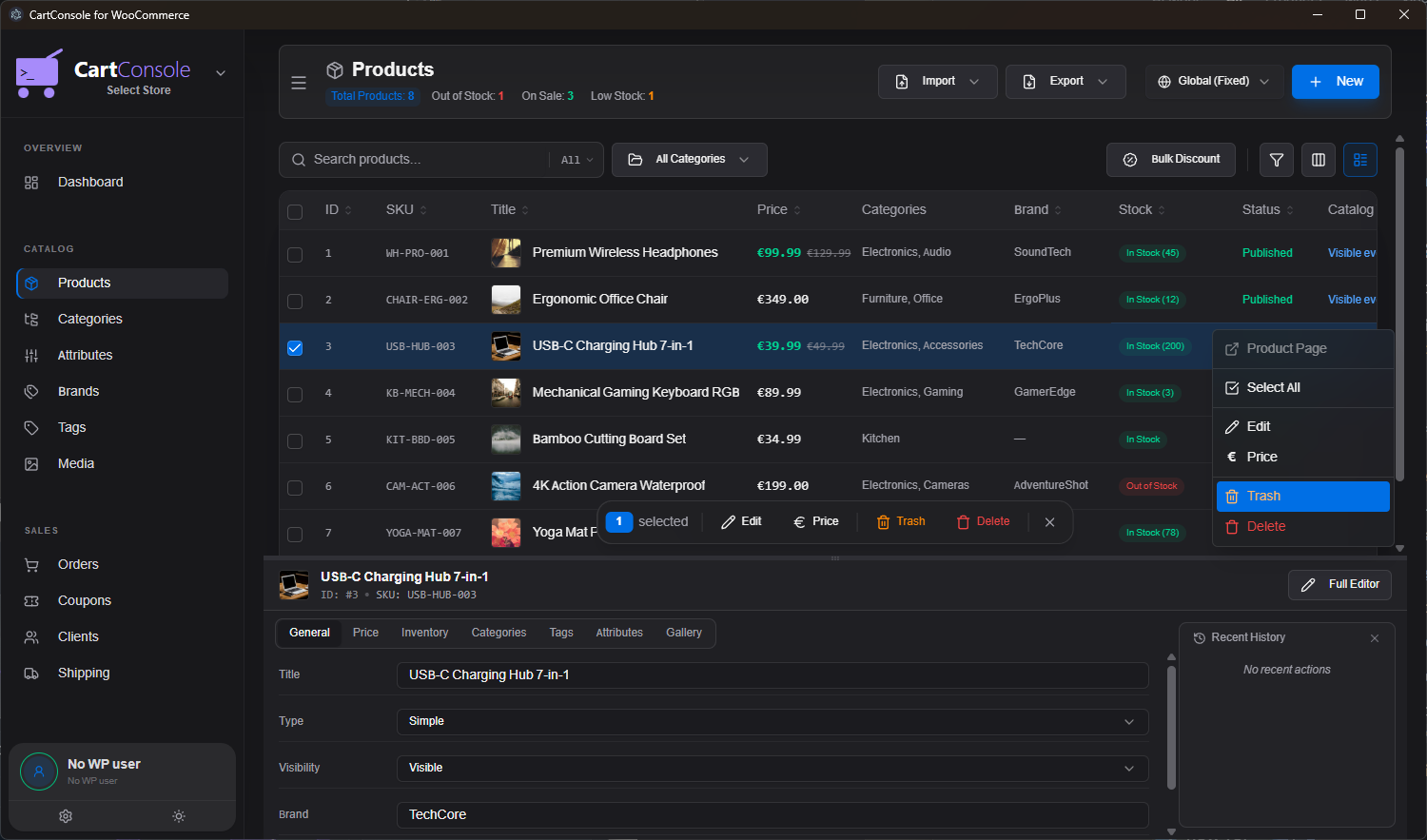
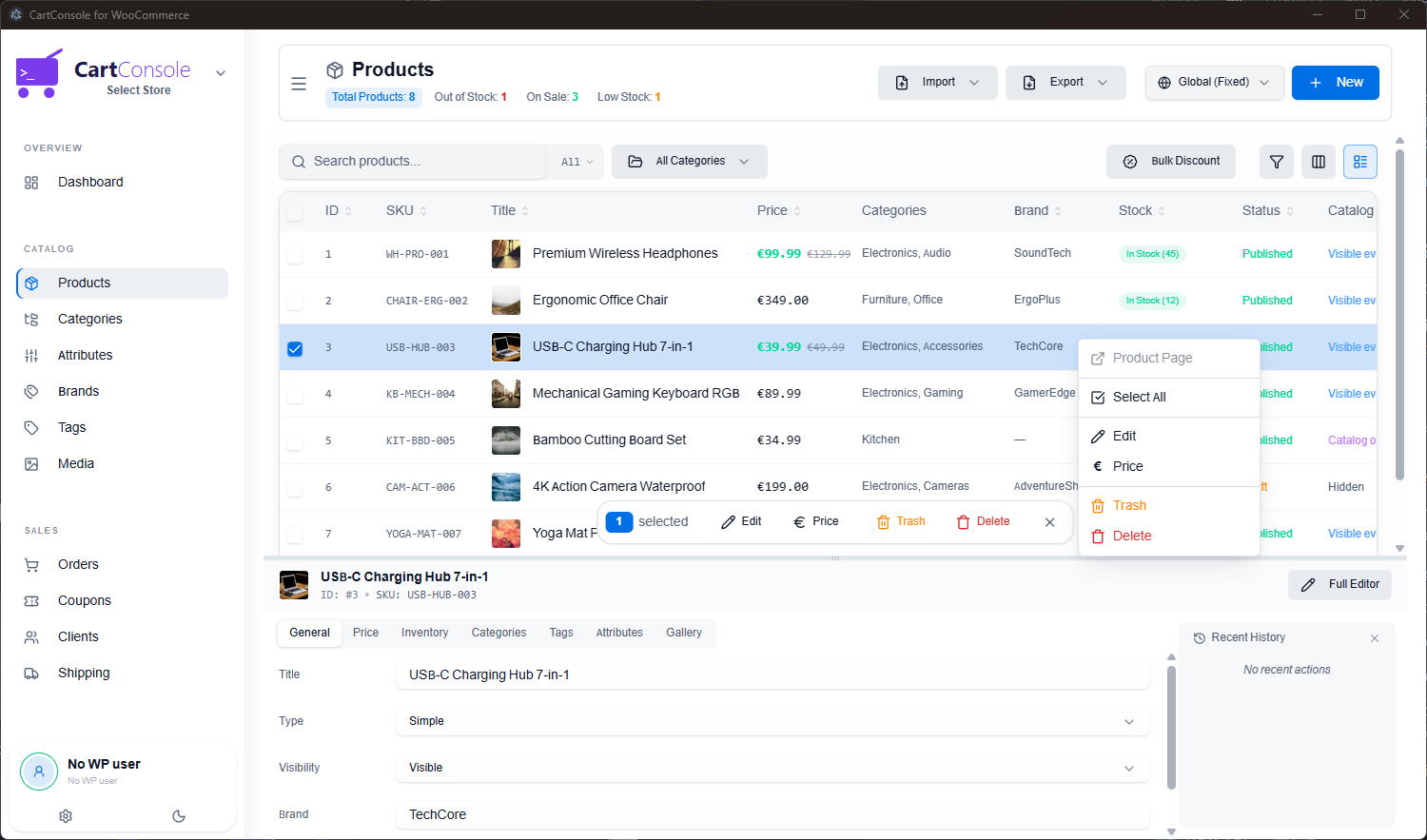
Edit products, variations, prices, and inventory in a powerful split-view interface. Right-click batch price changes (+, -, %, fixed) across hundreds of items.

✨

AI Quick Add & Auto-Fill

Create products in seconds with Gemini AI: auto-generate product names, descriptions, URL slugs, and auto-select matching categories from photos or brief notes.

📡

Offline Mode & Conflict Resolver

Immediate optimistic edits while offline with automatic sync on reconnect. Smart 1-to-1 visual conflict resolver prevents lost changes.

🛒

Order Processing

View, filter, and fulfill orders with real-time desktop notifications. Never miss a sale again.

🌍

6 Languages

100% translated in English, Greek, Spanish, German, French, and Italian. Switch anytime from Settings.

🔔

Real-Time Alerts

Desktop notifications for new orders, low stock, and out-of-stock products with customizable sound alerts.

🏷️

Full Catalog Control

Manage Categories, Attributes, Brands, Tags, Coupons, and Media — all from a single, unified interface.

🔌

Multi-Store Support

Connect and switch between up to 10 WooCommerce stores seamlessly. One unified app for all your e-commerce operations.

🎨

Dark & Light Themes

Beautiful dark and light modes that follow your system preferences or can be set manually. Easy on the eyes, day or night.

🔄

One-Click Auto Updates

Seamless update notifications with 1-click in-app downloading and background verification so you always run the latest version.

In Detail

Built for real store owners

Every feature is designed around the daily workflow of managing a WooCommerce store.

Product Management

Edit products at the speed of thought

CartConsole's split-view editor lets you browse your catalog on top and edit any product below — without ever leaving the page. Right-click context menus, inline price editing, bulk actions, and full gallery management.

  • ✏️ Inline editing with split-view panel
  • 🏷️ Bulk price changes & discount tools
  • 📸 Drag-and-drop image upload to WP Media
  • 🔍 Filter by category, brand, stock, or status
Product Management — Dark Product Management — Light
Order Management

Process orders without the browser

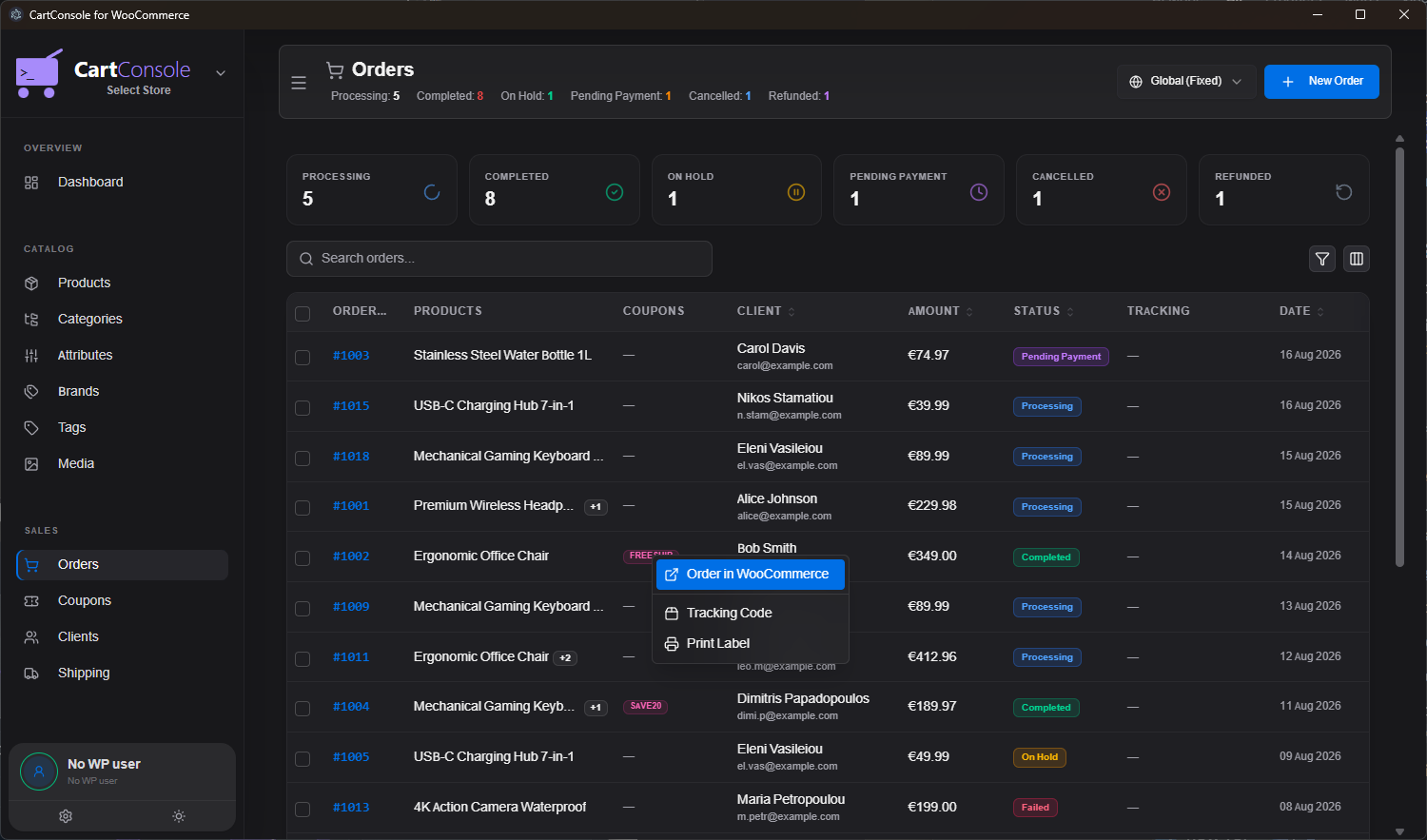
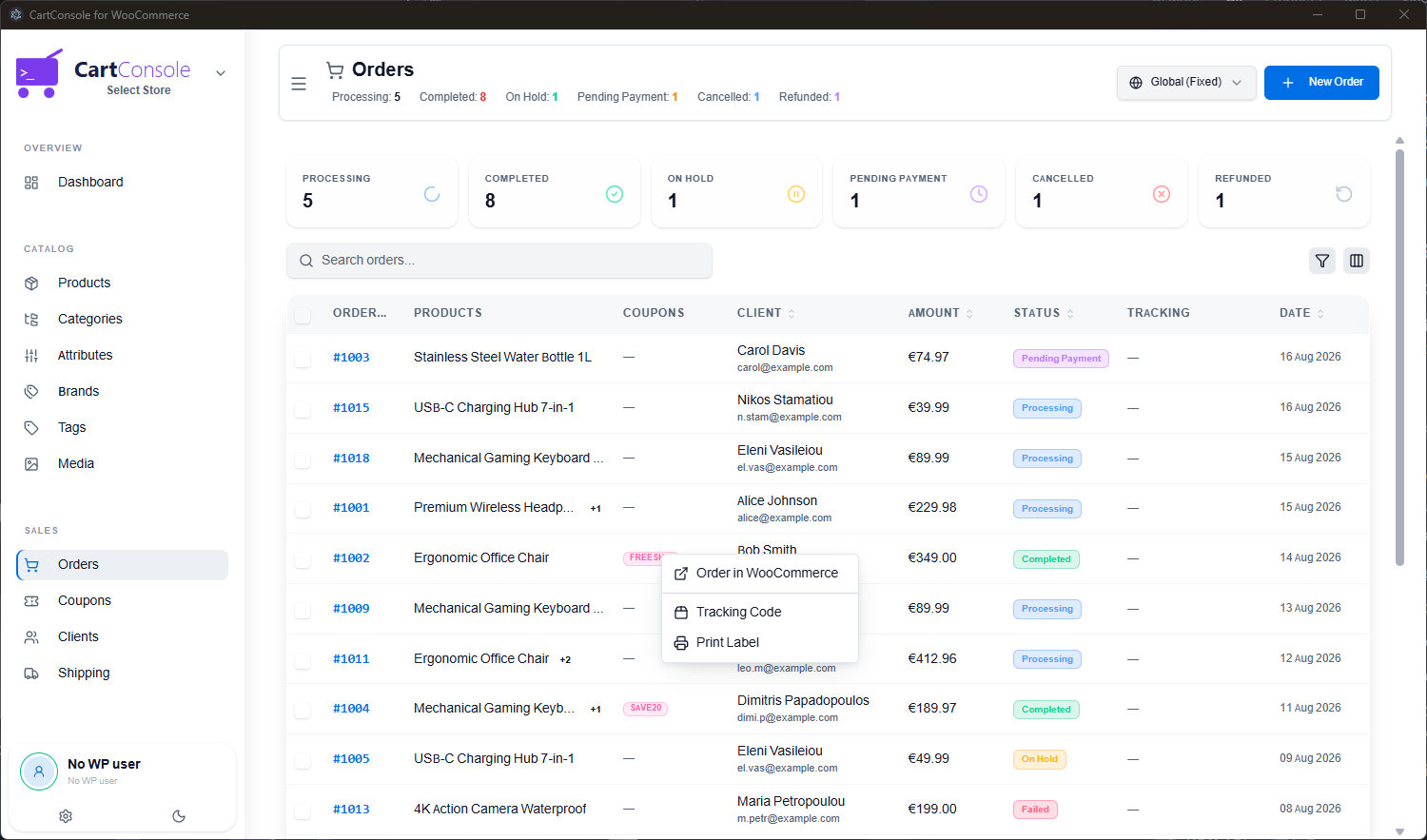
A dedicated orders view with status badges, client details, and quick actions — right-click any order to open it in WooCommerce, add a tracking code, or print a label. Desktop notifications alert you the instant a new order comes in.

  • 🔔 Instant desktop notifications for new orders
  • 📊 Status filters: Processing, Completed, On Hold, etc.
  • 🖨️ Quick actions: Print label, add tracking, open in WC
  • 🔊 Customizable notification sounds
Order Management — Dark Order Management — Light
Multi-Store Intelligence

Unified view across all your stores

Running multiple WooCommerce websites? The Unified View aggregates sales, recent orders, inventory counts, and activity feeds across up to 10 stores simultaneously. Spot low stock trends and review total revenue without switching tabs or signing into separate accounts.

  • 🌐 Consolidated catalog & order feed
  • 🎯 Color-coded store badges for effortless tracking
  • 📊 Combined revenue, orders, and sales metrics
  • ⚡ 1-click filtering by specific store or view all
Unified View — Dark Unified View — Light
Catalog Automation

AI-powered product creation & batch catalog tools

Speed up catalog expansion with smart creation workflows. Drop a product photo or jot a quick note, and Google Gemini AI automatically writes the title, full structured description, URL slug, and auto-selects the right store category. Plus, batch paste entire spreadsheets directly from Excel.

  • ✨ AI Auto-Fill: Auto-generated name, description, URL slug, and category matching from photos
  • 📋 Spreadsheet Batch Add: Copy & paste rows directly from Excel or Google Sheets
  • 🔄 1-Click Duplicate: Clone existing products, prices, and attribute terms instantly
  • 📂 CSV & Excel Bulk Import: Import or update hundreds of products with template validation
Quick Add — Dark Quick Add — Light
Work Modes

Offline optimistic UI & smart conflict resolver

CartConsole gives you three distinct work modes so you can manage your store from anywhere — even on a flight or with spotty internet. Product and order edits update locally on screen immediately with a pending change counter. When reconnected, changes auto-sync or present a clean visual 1-to-1 diff if server data was modified.

  • 🟢 Online: Direct high-speed API communication with your store.
  • 🔵 Offline Auto-Sync: Local optimistic updates that sync automatically when reconnected.
  • 🟠 Offline Manual: Complete control over when local changes are submitted to the server.
  • 🛡️ Smart Conflict Resolution: 1-to-1 visual comparison showing local vs store values to prevent accidental overwrites.
Dashboard — Dark Dashboard — Light
Screenshots

See it in action

Real screenshots from the CartConsole desktop application.

Demo

Watch CartConsole in action

See how CartConsole transforms the way you manage your WooCommerce store.

Pricing

Simple, transparent pricing

Start your 14-day free trial today. No commitment, cancel anytime.

Monthly
Pay as you go. Full flexibility.
€ 9 .99/mo
Billed monthly
  • Full app access
  • Up to 10 stores
  • Offline mode & sync
  • Real-time notifications
  • All future updates
  • Priority support
Start 14-Day Free Trial

🚀 Founders Discount — First 100 Customers

Get 20% off your subscription for 1 year. Use the code below at checkout:

FOUNDERS20
Click to copy • Limited to the first 100 subscribers • Monthly subscriptions only
FAQ

Frequently Asked Questions

Everything you need to know about CartConsole.

All plans come with a 14-day free trial so you can fully test CartConsole with your own stores. A payment method is required to start the trial, but you won't be charged until the 14 days are up, and you can cancel anytime before then right from your Lemon Squeezy customer portal.

CartConsole is a standalone desktop application for Windows that connects to your WooCommerce store via the official REST API. It provides a fast, native interface for managing products, orders, customers, categories, coupons, and more — without ever opening the WordPress admin panel.

No. CartConsole connects directly through the WooCommerce REST API, which is built into WooCommerce by default. You simply generate API keys from your WooCommerce settings and paste them into CartConsole. No plugins, no server modifications.

CartConsole offers three work modes: Online (direct API calls), Offline Auto-Sync (changes are queued locally and synced automatically when you reconnect), and Offline Manual (changes are queued until you explicitly press "Sync Now"). This lets you work from anywhere, even without internet access.

Yes! You can connect up to 10 WooCommerce stores and switch between them instantly or activate the Unified Multi-Store View to see orders, product inventory, and performance metrics from all your stores in one combined dashboard.

CartConsole includes a dedicated Quick Add Product dialogue powered by Google Gemini AI. You can drop in a product photo or draft notes, and AI will automatically generate an attractive title, SEO-friendly URL slug, full HTML description, and auto-match the right category from your store. You can also paste product rows directly from Excel or import CSV/XLSX spreadsheets in bulk.

The full CartConsole interface is available in 6 languages: English, Greek (Ελληνικά), Spanish (Español), German (Deutsch), French (Français), and Italian (Italiano). More languages will be added in future updates.

Absolutely. CartConsole communicates directly with your WooCommerce store — your data never passes through our servers. API keys are stored securely on your local machine. All communication uses HTTPS encryption.

If you cancel, your license key will expire at the end of your current billing period. You will not be charged again, and you can re-subscribe at any time to regain access. Your store data is never affected — CartConsole only reads and writes through the WooCommerce API.

CartConsole is currently available for Windows. Mac and Linux versions are planned for a future release. Stay tuned!

Contact

Get in touch

Have a question, feature request, or need help? We'd love to hear from you.

Let's talk

Whether you have a question about features, pricing, need a demo, or anything else — our team is ready to answer all your questions.

✉️
💬
Response Time
We typically respond within 24 hours